How to Withdraw Money from Betpkr?
Withdrawing money from Betpkr is simple. Follow these steps to ensure a smooth withdrawal:
Step 1: Log in to Your Account
- Go to the official Betpkr website.
- Enter your username and password to log in.
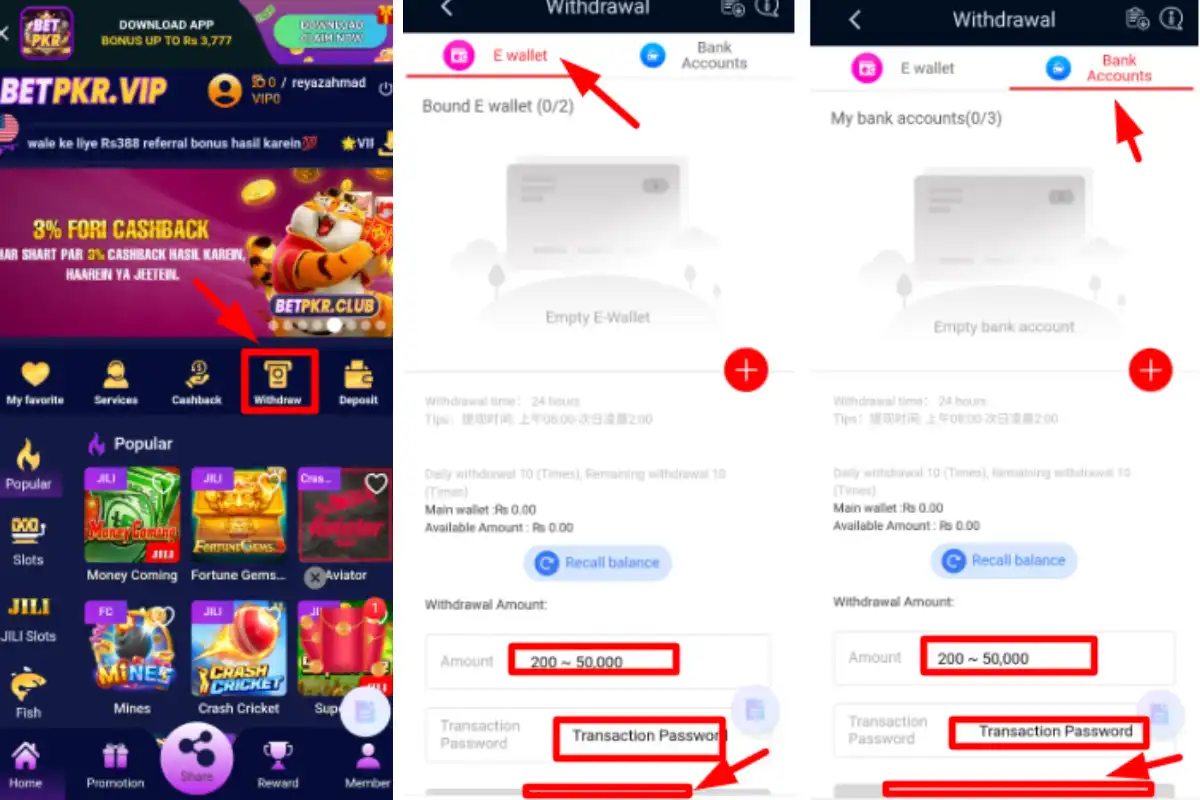
Step 2: Navigate to the Withdrawal Section
- Click on your profile or account settings.
- Select the "Withdraw".
Step 3: Choose a Withdrawal Method
Betpkr supports various withdrawal methods, including:
- EasyPaisa
- Jazzcash
- Bank Account
- Cryptocurrency (Bitcoin, Ethereum, etc.)
Note: Some methods may only be available if you used them for depositing.
Step 4: Enter Withdrawal Amount
- Check your account balance to ensure you have enough funds.
- Enter the amount you want to withdraw.
- Some methods have minimum and maximum withdrawal limits, so check before proceeding.
Step 5: Confirm and Submit Withdrawal Request
- Review your details carefully.
- Click on "Confirm Withdrawal" to initiate the transaction.
- You may receive a verification request (via email or SMS) for security purposes.
Step 6: Wait for Processing
- Withdrawal processing times depend on the chosen payment method (see the table below).
- You will receive a confirmation email once the funds are transferred.
Withdrawal Fees
Betpkr typically does not charge withdrawal fees, but some payment providers (banks, e-wallets) may apply transaction charges. Always check with your bank or e-wallet provider for any additional fees.
Common Withdrawal Issues and How to Fix Them
? Withdrawal Request Declined
? Ensure you have met wagering requirements (if you used bonus funds).
? Confirm that your payment method matches the one used for deposit.
? Delayed Processing
? Check if account verification is required.
? Contact Betpkr customer support for assistance.
? Funds Not Received
? Wait for the processing time to complete.
? Check with your bank or e-wallet for any pending transactions.